
How We Find, Verify, and Track Copies of Your Video
Upload a video or paste a link to search for matching content online. Review potential copies, compare matching footage, and collect evidence to help you decide what to do next.
Five short walkthroughsRecorded in the real product with a demo account. Other creators' pictures and names are blurred.
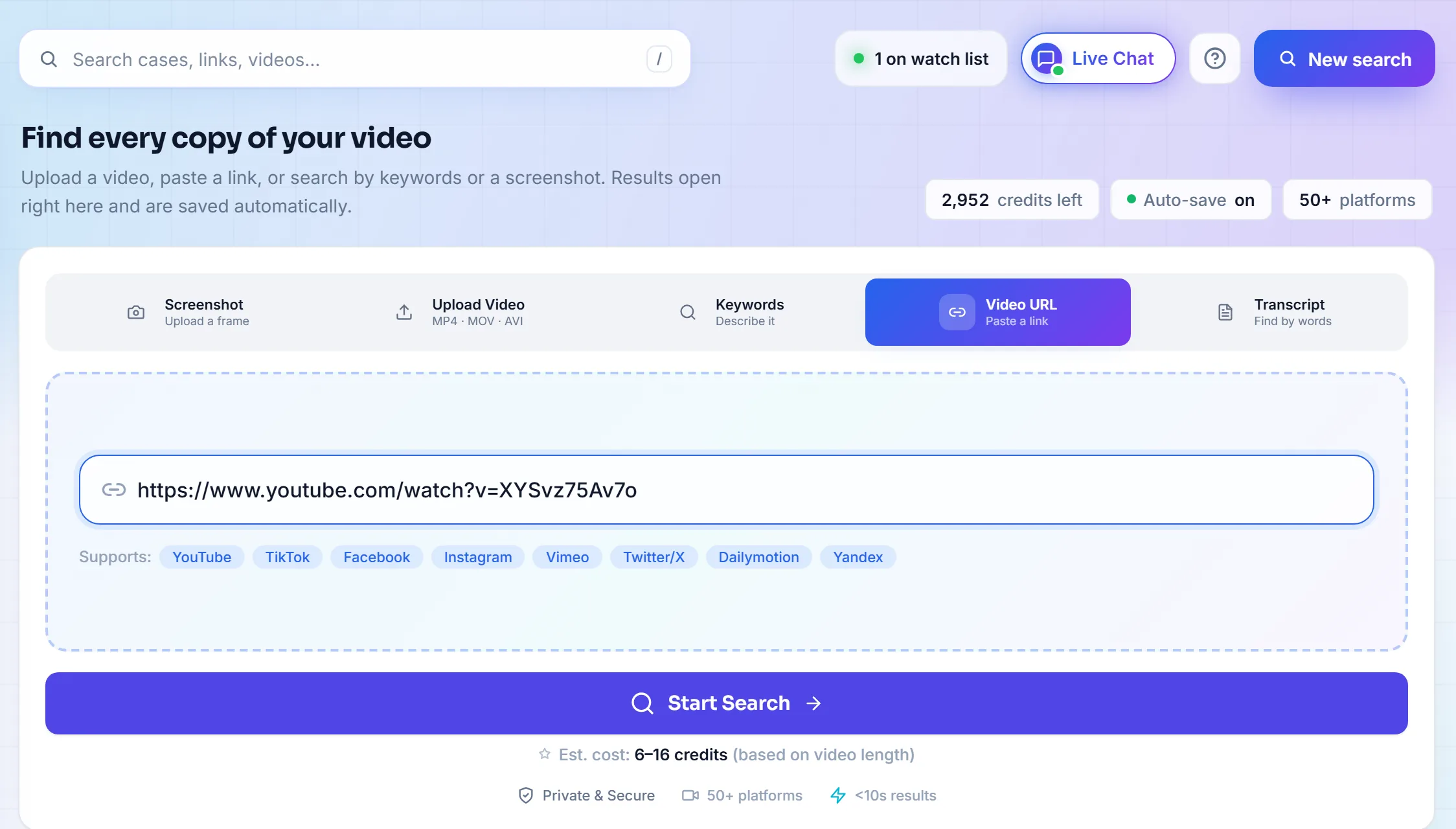
Find every copy
Upload your video, paste a URL, or search using a screenshot, keywords, or spoken dialogue. Our tool picks the key frames of your video and uses them to search for matching footage online. This can help you find reposts even when the original title, caption, or tags have changed.
- 1Five ways to search
Upload a video, paste a link, use a screenshot, enter keywords, or search with a video transcript.
- 2Paste a link
YouTube, TikTok, Instagram, Facebook, X, Vimeo, Dailymotion, and more.
- 3Start your search
The search runs in the background. You can leave the page. Once the search is done, you can return to view it.
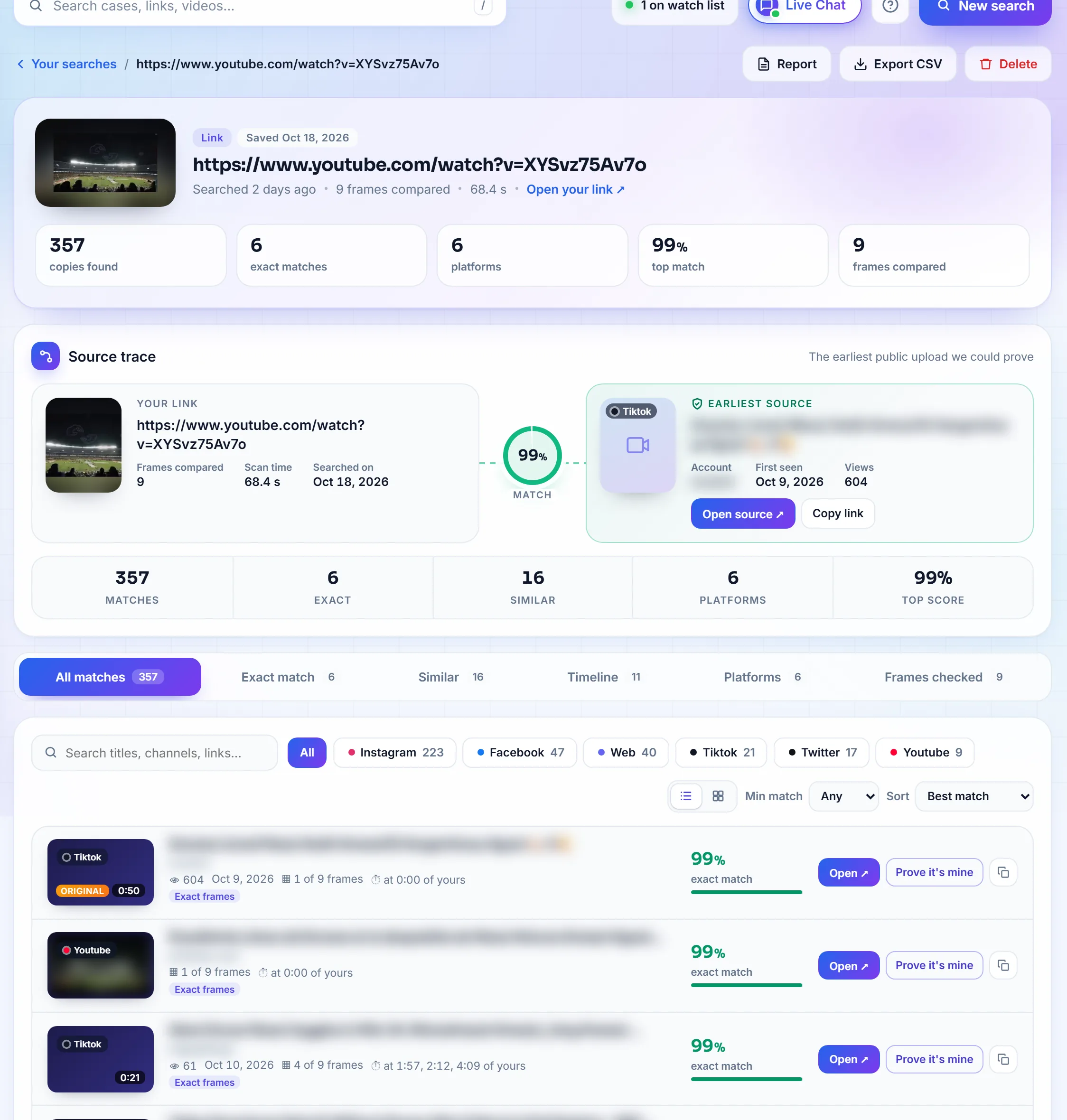
- 1Copies at a Glance
See how many copies we found, how many are exact, which platforms they appear on, and which result matches the most.
- 2Earliest Source Found
See the earliest public upload we found among the confirmed matches, with the account name and the upload date.
- 3Filter by Platform
Narrow your results to only Instagram, TikTok, YouTube, Facebook, X or web pages to find relevant matches faster.
- 4Match Score
View how closely each result matches your video based on a frame-by-frame comparison.
- 5Create a Proof Kit
Compare your original video with a suspected copy, second by second, and collect the matching footage for the proof kit.
- 6Exact Matches
View only the results that passed our visual verification checks, helping you focus on copies with confirmed matching footage.
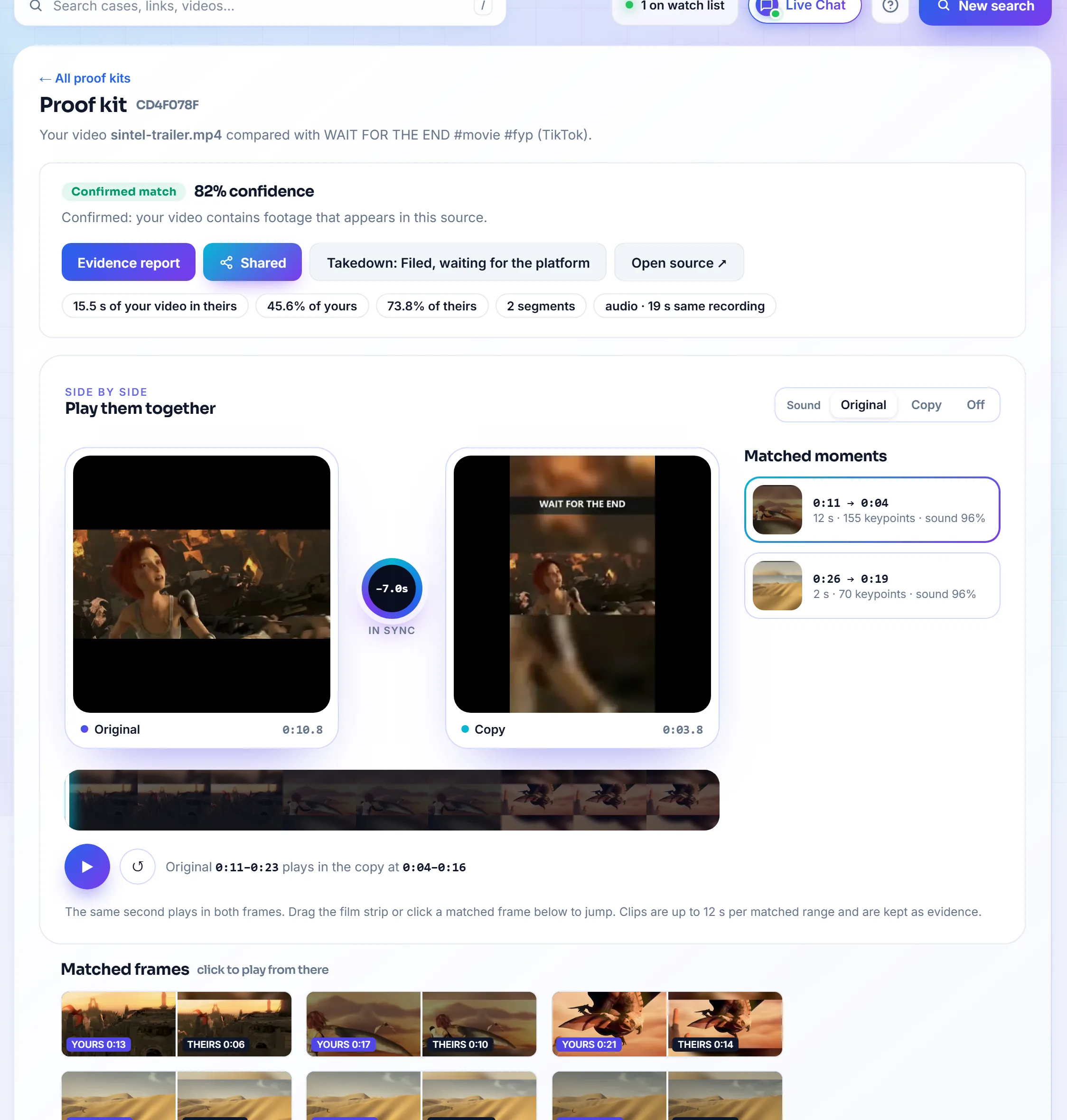
Prove it's yours
Build a proof kit to compare your video with a suspected copy. Review matching sections, play both videos side by side, and check audio similarities separately. The kit also records file fingerprints and generates an evidence report so anyone can check the result later.
- 1The Verdict
Check whether a match is confirmed, likely, or unconfirmed, with a confidence score.
- 2The Numbers
Review how many seconds of your video match, and what percentage of each video they represent.
- 3Play Them Together
Play both videos side by side, with playback synchronized to the same second.
- 4Matched Moments
See each matched section, with the keypoints used for comparison and sound match.
- 5Matched Frames
View frame pairs from matching timestamps. Select a pair to jump to that point in the video.
- 6Report and Share
Download the evidence report, or share a link with a platform or a lawyer.
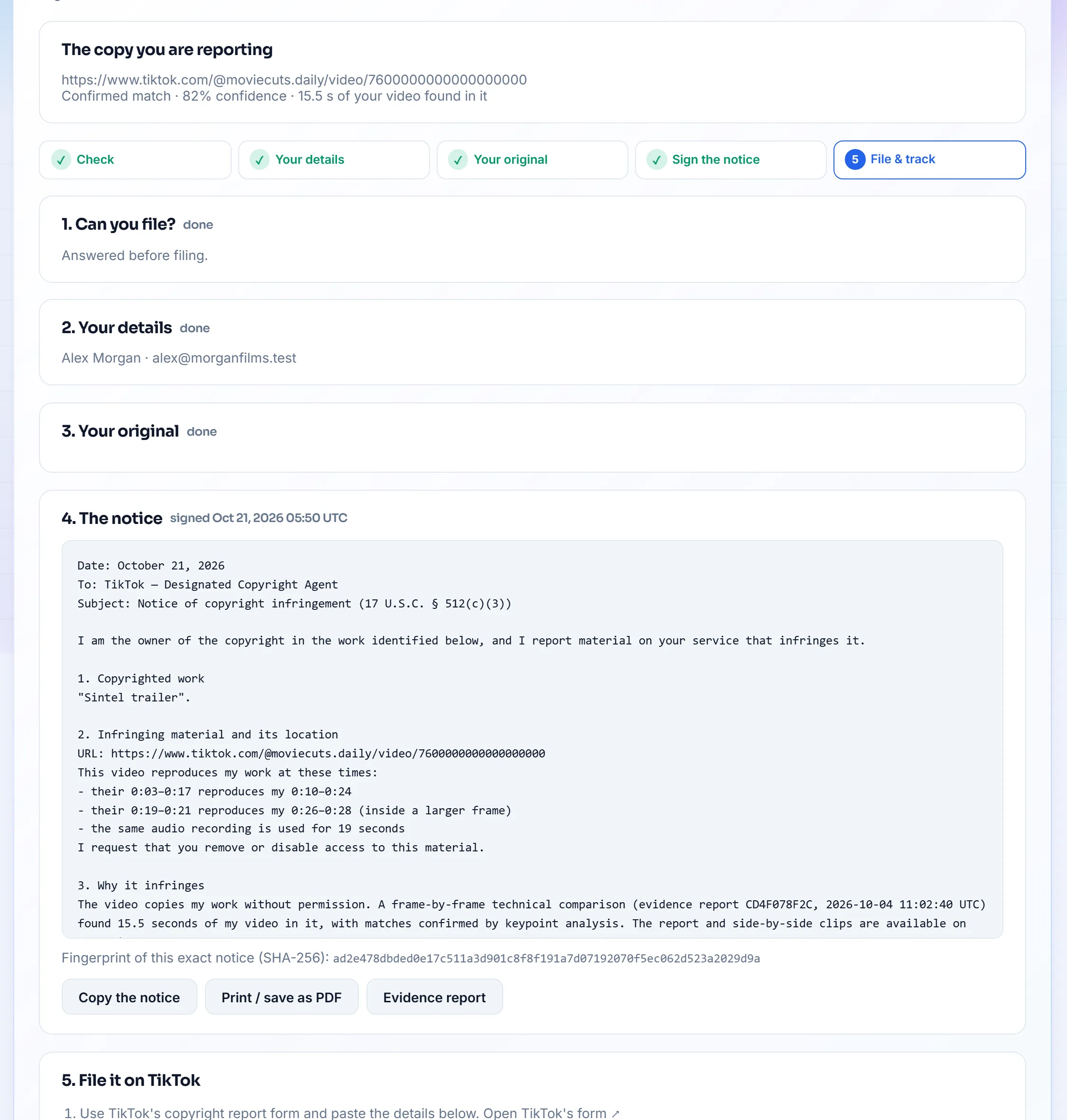
Prepare a Copyright Takedown Request
From a confirmed proof kit, we guide you through a copyright takedown: a check that you are allowed to file, your details, your original, and your signature. We write the notice with the exact matching times and show you what to paste into the platform's form. After you file, you can track the reported URL afterward.
- 1Five Steps
Follow each step, from checking eligibility, providing details, reviewing original work, to signing and filing the request.
- 2The Notice
Get a drafted notice with relevant details and matching timestamps from your proof kit.
- 3Copy, Print, or Attach
Copy the notice, save it as a PDF, or attach the evidence report to the platform's form, where supported.
- 4A Fingerprint of the Notice
Use a SHA-256 fingerprint to help detect changes to the signed notice text.
Monitor Your Videos for New Reposts
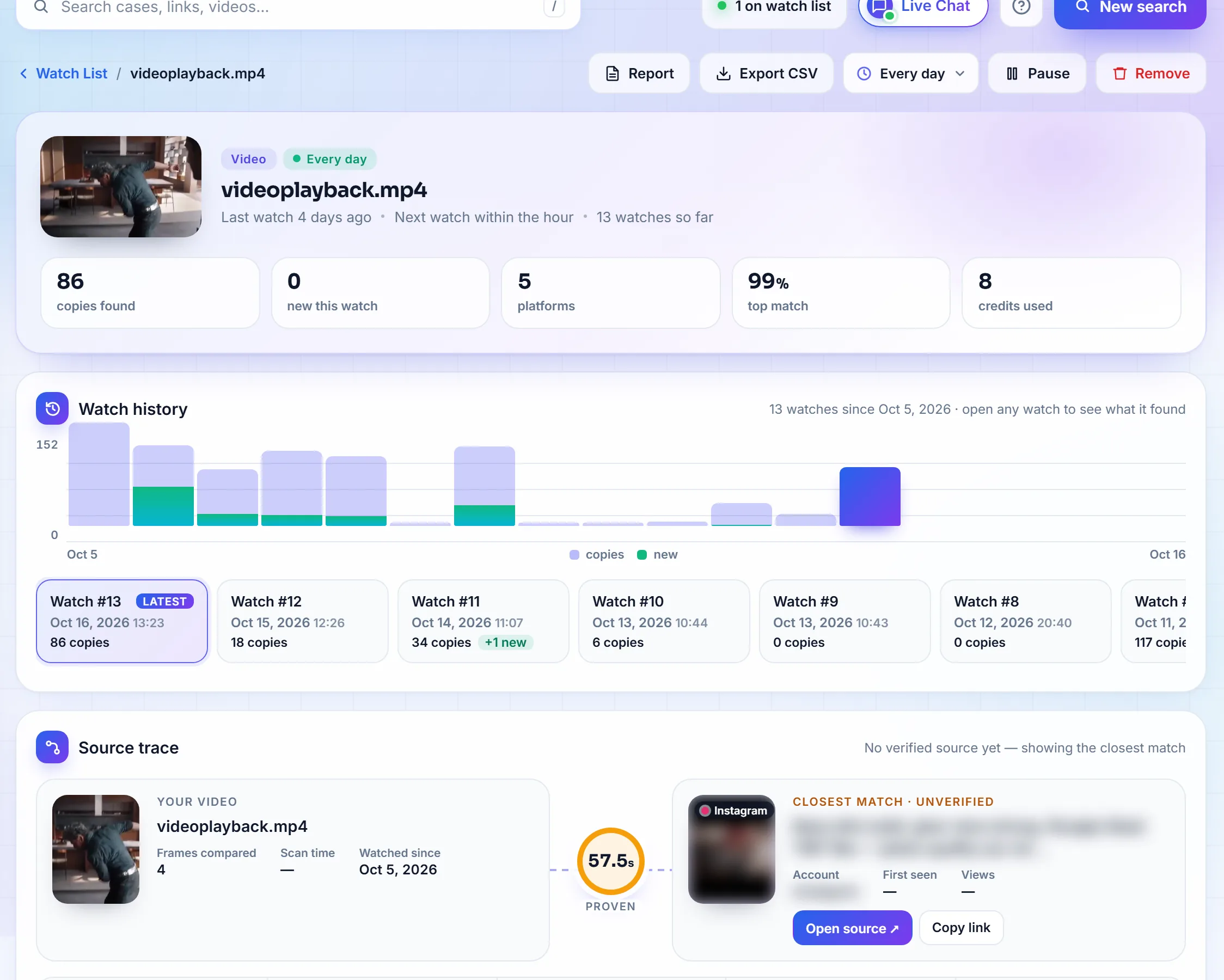
Finding one copy doesn’t mean others wouldn’t come later. You can add your video to the Watch List and choose a monitoring schedule. We save every check, flag new copies, and send you a daily email summary. Each check costs the same credits as a search you run yourself. On Enterprise plans, Auto-protection can go one step further and prepare and file the takedown for you, as described below the screen.
- 1How Often
Choose a monitoring schedule: daily, every few days, weekly, or monthly.
- 2Copies Found
Review all confirmed copies detected across your monitoring history.
- 3New This Watch
Identify copies discovered for the first time during the latest check.
- 4Watch History
Track each check in a bar chart showing the total copies found and how many were new.
- 5Any Past Check
Open a previous check to review the results found on that date.
Let Auto-protection File for You
Watching tells you a copy came back. With Auto-protection, available on Enterprise plans, the next steps happen on their own: the proof kit from step 2 is built, the notice from step 3 is prepared, and it is filed through the platform's copyright agent. By default, you approve every notice with one click before it leaves.
- 1A Copy Is Proven
The Watch List confirms a copy that uses at least the number of seconds you set. The default is 5. Shorter matches are not filed.
- 2The Proof Kit Builds Itself
The same kit as in step 2, with matched sections, file fingerprints and the evidence report, is built without anyone starting it. It gets a public link that the notice can cite.
- 3The Notice Is Prepared
It carries your details, the exact matching times and the evidence link, and is signed under the standing authorisation you set up once. A notice is a legal statement, so by default it waits for you to approve it.
- 4It Goes to the Platform
We email the notice to the platform's registered copyright agent, a few a minute. If we have no agent address for a platform, the notice waits as Ready to file, with the details prepared for the platform's own form.
- 5We Check Until It's Gone
We check the reported URL every day. If it is still online after 5 days (7 for Facebook and Instagram), we send one reminder. If a removed copy comes back, the same signed notice is sent again. A page that blocks our check is marked unknown, never removed.
Protect and Check
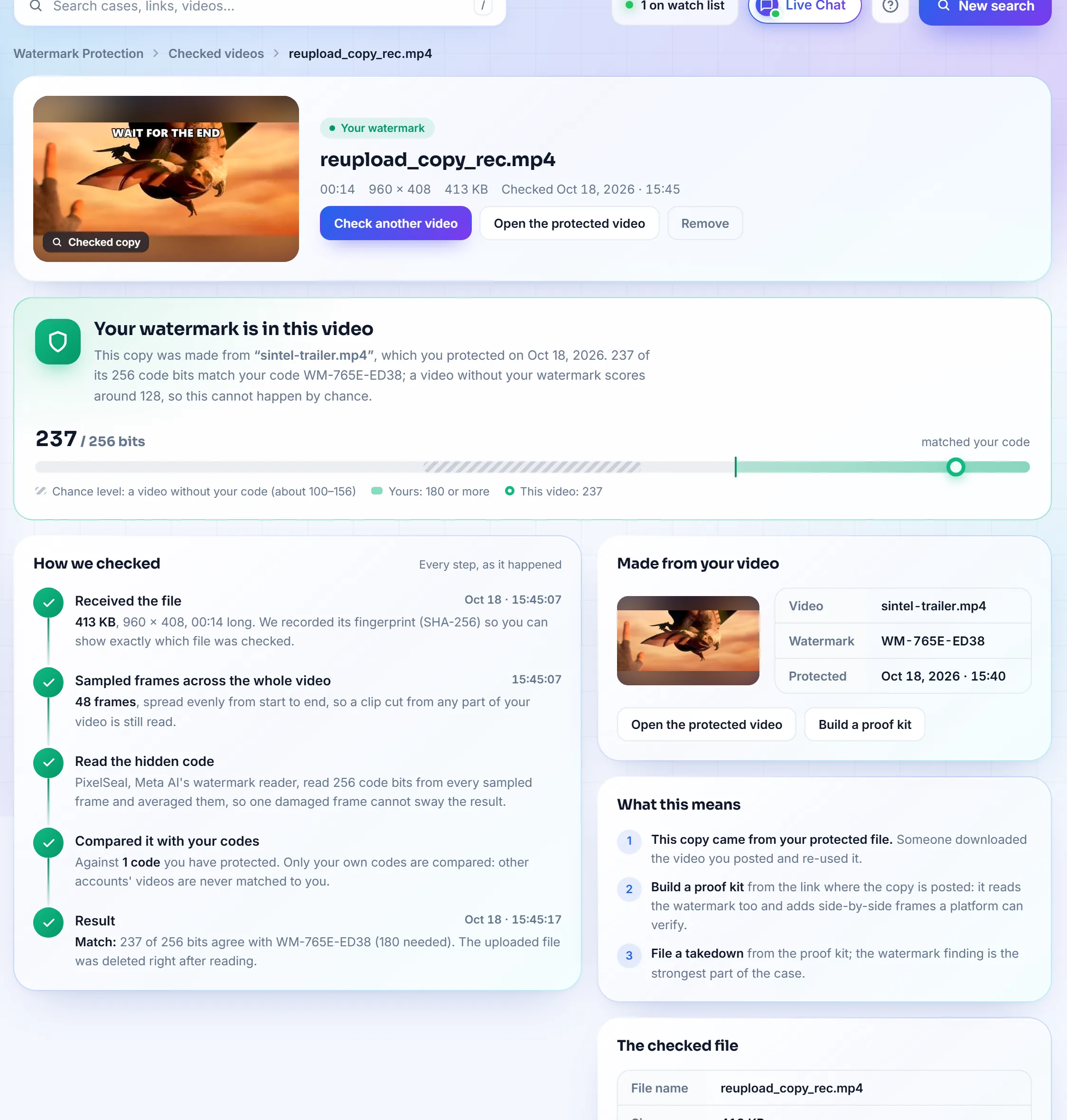
Watermark Protection embeds an invisible code into every frame before you publish your video, without changing its appearance or sound. When you find a suspected copy, upload it to check whether the code can identify the original video. The video metadata viewer reads what a file says about itself: the device, the software that wrote it, and what it gives away.
- 1The Result
Check whether your watermark code was detected and identify the protected video it belongs to.
- 2Matching Bits
Find out how many of the 256 bits match your code. Random data would match about half on average; 180 bits is the stated threshold.
- 3Verification Process
Review every step and its timestamp. The uploaded copy is deleted right after reading.
- 4Made from Your Video
Check the protected original and its watermark ID, then build a proof kit.
How Video Matching Works
The methods behind every step, with the thresholds our code uses today.
How do you find copies of my video on the web?
Every search starts with the video, link, screenshot, keywords, or dialogue you provide. For videos, we select a small set of keyframes that represent different scenes, avoiding frames that look too similar. This helps us search more efficiently without repeatedly checking nearly identical images.
For links, we first retrieve the video from the platform or use a fallback downloader when automated access is blocked. We then apply the same matching process.
Pick keyframes
We select up to nine frames from your video, prioritizing distinct scenes to reduce duplicate checks.
Search with Every Frame
Each keyframe is used in a visual web search to find pages containing similar images.
Search Video Platforms
We also search supported platforms, including YouTube, TikTok, X, Facebook, and Dailymotion, using words from the video, such as its title, captions, spoken dialogue, and on-screen text.
Compare Every Candidate
We compare candidate footage against your original frames, after trimming black bars and trying crops and other aspect ratios.
Check the Geometry
Promising candidates get a keypoint check. Distinctive points in your frames must align with those in the candidate through a consistent visual transformation.
Rank and Date Results
We prioritize confirmed matches, followed by partial matches. Upload dates are taken from the relevant platform when available.
What counts as a match?
Sometimes two videos can look similar without being the same footage. They may contain identical sunsets, a person at a desk, or other scenes that can produce similar images. That's why we use two checks to ensure accuracy. We check how closely the images resemble each other and whether their visual details align.
- Perceptual fingerprint: This compact digital signature measures how similar two frames look. It can still recognize similarities when images have been resized, cropped, or slightly changed in colors. However, unrelated images from similar scenes can sometimes produce close results.
- Keypoint check: This method looks for distinctive points in both images and checks whether they align through a consistent geometric transformation. For the same footage, we typically find 24 to 31 good correspondences, with 95% to 100% fitting the transformation. Unrelated scenes may produce a few matching points, but rarely show the same level of alignment.
How We Classify Results
A result can qualify as a match through either of two routes: a perceptual fingerprint similarity of at least 80%, or a keypoint check with at least 16 matching points out of 20 or more good correspondences, with at least 45% fitting the geometric transformation. A weak fingerprint signal must also support the keypoint result.
We also apply a 45% fit requirement to reduce false positives. During testing, we found that fingerprint-only matches could sometimes promote unrelated candidates. A few keypoints can also align by chance, so we consider the proportion of points that fit the transformation, not just the total number detected.
Understanding Match Results
The footage passes the keypoint geometry check, with matching points aligning through a consistent transformation. These results can be used to build proof kit comparisons.
The frames have a high perceptual fingerprint similarity, typically 92% or more, but do not pass the keypoint check. These results may be similar footage, but aren't confirmed matches.
The audio tracks match, but the video frames do not meet the visual matching criteria. We report these as audio similarities, not confirmed video copies.
How do you decide who posted first?
Among visually confirmed copies, we identify the earliest upload based on the publication date provided by the platform. If no confirmed matches are available, we use the highest-ranked results instead.
- Platform dates: We use the publication dates listed in each platform's own records.
- TikTok timestamps: TikTok's video ID contains encoded upload-time information, which we can use to determine when a video was published.
- Saved post details: Each proof kit records available platform information, including the uploader, post ID, and publication time.
The earliest upload we find can provide useful evidence of when a video appeared online, but it doesn't establish authorship on its own. A video may have been shared privately first, posted on an account that was later deleted, or uploaded somewhere search engines haven't indexed.
How are two videos compared second by second?
A proof kit takes a closer look at two specific videos. It helps determine whether a suspected copy came from your original and identifies the exact sections they have in common.
- Sample frames: Both videos are sampled every half second. For longer videos, the sampling interval increases slightly to keep comparisons efficient. Videos of up to two hours can be analyzed.
- Check different image versions: Each frame gets several perceptual fingerprints, covering the full image, its centre, mirrored version, individual quarters, and a vertical strip for landscape footage. This helps detect matches even when a video has been cropped, flipped, or reframed.
- Line up matching footage: Matching frames are aligned by timestamp. When at least three consecutive samples match, they're grouped into a matched range, with start and end times recorded for both videos.
- Verify each range: Three frames from each matched range undergo a keypoint check. If their visual geometry aligns, the range is marked as verified. If the frames are at least 92% similar but don't pass this check, the range is labelled likely.
- Account for editing changes: The system can detect speed changes in matched sections lasting at least six seconds. It adjusts playback speed to help both clips line up. When your footage appears inside a larger video, such as a reaction or news clip, the matching section is located and isolated for comparison.
- Keep only relevant evidence: For each matched range, we retain a clip of up to 12 seconds from each video, along with selected frames. We don't retain the complete videos.
How is the sound compared?
We analyze audio separately because a video can retain its original soundtrack while changing the visuals, or reuse the same audio with completely different footage.
- Audio analysis: Each soundtrack is converted into a representation of its loudness across 16 frequency bands, sampled ten times per second.
- Compare sound patterns: We compare the audio in four-second windows, moving forward one second at a time and testing different time offsets. A window qualifies when its correlation reaches 0.65. An isolated match needs a stronger score of at least 0.85.
- Report audio matches separately: If the audio matches but the visuals don't, we label it as the same recording rather than the same video. Since many videos reuse music and sound clips, an audio match alone can never confirm a video copy.
How do you make the evidence checkable?
A proof kit is meant to be checked by people who have no reason to trust us: a platform, a lawyer, the other side.
- SHA-256 fingerprints: We generate a SHA-256 fingerprint for both videos and every retained file. The report recalculates these fingerprints whenever it's opened, helping identify any changes.
- Downloadable evidence bundle: The bundle includes the report, retained files, notice text, and a MANIFEST-SHA256.txt file. Anyone can use the standard sha256sum -c command to check file integrity.
- Automated capture record: A capture certificate documents what our system retrieved, the source URL, and when the content was collected.
- Daily takedown checks: After a takedown request is filed, we check the reported URL each day. If a page blocks our verification attempt, we mark its status as unknown rather than treating it as successfully removed.
How does the invisible watermark work?
Before publishing your video, you can embed an invisible 256-bit code into every frame using PixelSeal, an open-source watermarking model from Meta AI. The watermark uses subtle pixel-level changes that don't visibly alter the video.
- Verify before download: Every watermarked video is checked after processing. It must return at least 180 of the 256 bits before the protected file is made available for download.
- Check multiple frames: When you upload a suspected copy, we analyze 48 frames spread across the video and combine their results. This reduces the influence of individual frames that may have been damaged or altered.
- Understand the detection threshold: A video without your watermark would match approximately 128 bits by chance. Reaching the 180-bit threshold randomly has odds of roughly 1 in 30 billion.
- Test against common edits: In our tests, the system detected 38 out of 40 copies altered through re-encoding, cropping, mirroring, speed changes, filters, captions, excerpts, and screen recordings. Across 440 tests using videos without the watermark, none reached the detection threshold. Both missed copies involved a phone camera recording a screen.
Written from the code that runs our searches, proof kits, watermark and metadata viewer, with the thresholds it uses today. Last reviewed October 21, 2026.
Try it on your own video
Run a search with your video or its link, or open a real proof kit our engine built from an edited copy.